
ExifBatch app icon

ExifBatch for macOS

Put old photos
back in time.

Repair dates and locations across whole photo folders with a focused Mac app that previews every change first.

Made for Mac macOS 14+ Apple notarized
Made for MacNative SwiftUI app
Apple notarizationCompleted
One-time purchase$24 · No subscription
JPEG + HEICWhole folders at once
Originals preservedEdits export as copies
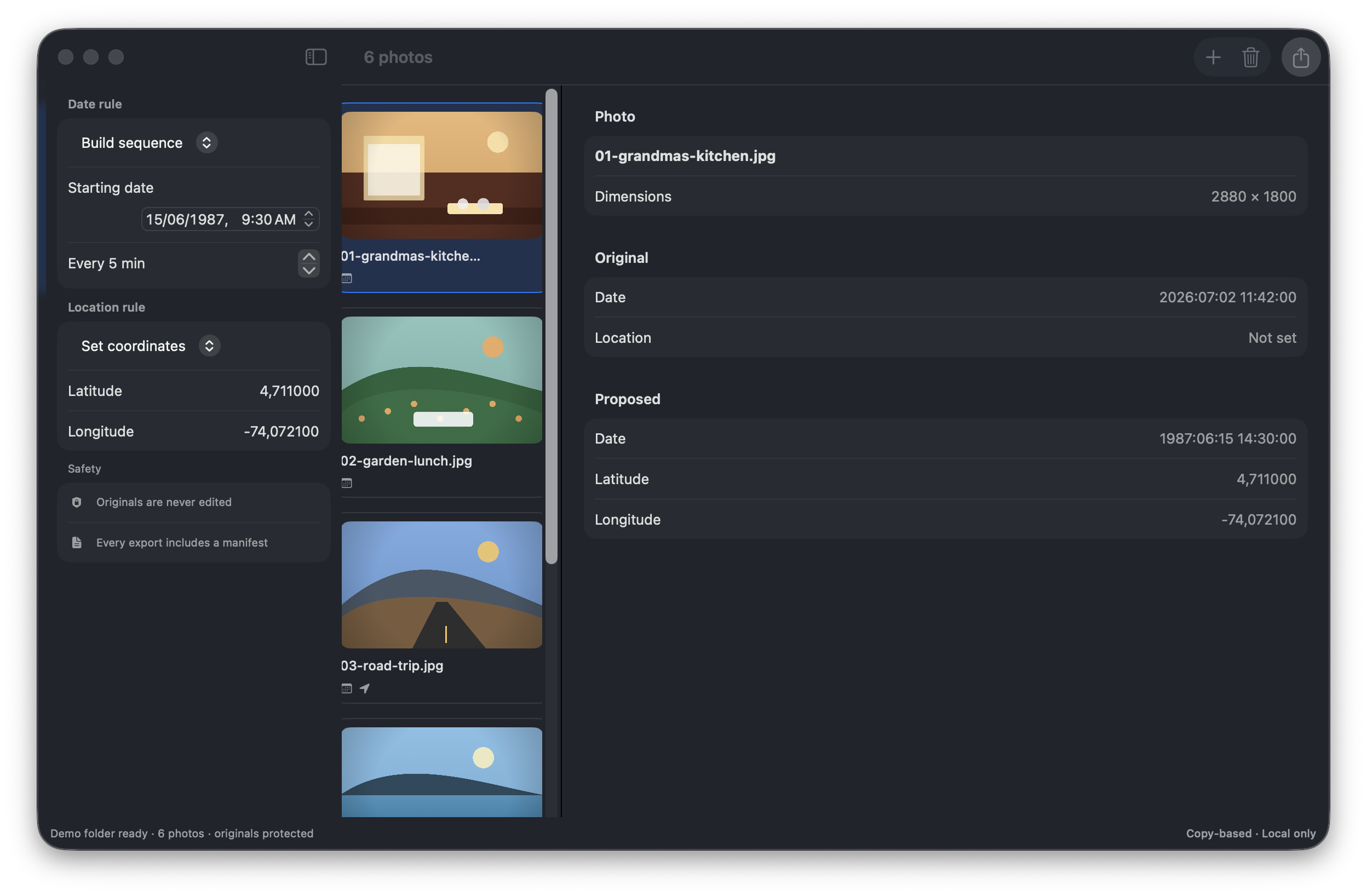
Real ExifBatch window with photo thumbnails, date and location rules, and original versus proposed metadata
Before

IMG_0042.JPG · March 3, 2026

After

Grandma's kitchen · June 15, 1987

Actual Release build · six safe fixtures

See the change
before it lands.

This is the native app sequencing six photos from June 15, 1987 and adding known coordinates. The original and proposed metadata stay side by side for every image.

ExifBatch 0.1.0 · macOSREAL APP PHOTOGRAPH
ExifBatch running on macOS with six photos, a five-minute date sequence, Bogotá coordinates and original versus proposed metadata
Captured from the native Release build. The pictured fixtures are generated and contain no personal photos.View full size ↗

Where it earns its place

Four photo folders that need a careful batch.

01

Family scans

Sequence scanned prints so they appear in the decade they belong to.

02

Wrong camera clock

Shift an entire shoot after discovering the camera date was off.

03

Privacy before sharing

Remove embedded GPS data from a folder without touching the originals.

04

Trip recovery

Restore known dates and coordinates before importing an old archive.

WHAT YOU KEEPExifBatch Output/exifbatch-manifest.jsonSource hashes verified

The metadata gap

The scan is new.
The memory isn't.

Scanners, messaging apps and photo editors often give an old image today's date—or no useful date at all. Photos then land in the wrong decade, locations disappear and family timelines become noise.

ExifBatch gives that specialist cleanup job a focused workspace: original and proposed values side by side, one rule across a folder and a separate output you can inspect before importing.

A reversible batch workflow

Repair a folder
without risking it.

  1. 1

    Choose photos or a folder

    Import JPEG and HEIC files explicitly. ExifBatch reads capture date, GPS location and pixel dimensions on this Mac.

  2. 2

    Build the date rule

    Set one date, shift existing dates or sequence a folder from a known starting point and interval.

  3. 3

    Preview original vs proposed

    Inspect each photo and catch missing source dates or invalid coordinates before anything is written.

  4. 4

    Export copies plus manifest

    Receive a separate folder and JSON record containing source hashes, original values, updated values and failures.

exifbatch-manifest.json✓ verified
{
  "source": "scan-042.jpg",
  "sourceSHA256": "8ce1...4a20",
  "originalDate": null,
  "updatedDate": "1987:06:15 14:30:00",
  "output": "scan-042.jpg"
}

Safety is the feature

A change you can explain—and undo.

ExifBatch never treats a successful write as enough. It checks source hashes, reads the output metadata back and records what actually landed in the exported copy.

  • Source files are never the export destination
  • Invalid coordinates fail before a copy is created
  • Filename collisions receive safe suffixes
  • Every completed batch includes a portable manifest

Before you edit

ExifBatch FAQ

Can I batch change photo dates on a Mac?+

Yes. ExifBatch can set one date, shift existing capture dates or create a chronological sequence across a selected JPEG or HEIC folder.

Does ExifBatch modify my original photos?+

No. ExifBatch writes new copies to a separate output folder and verifies the source hash before and after export.

Can ExifBatch remove GPS location from photos?+

Yes. You can remove embedded GPS coordinates from a batch or set specific latitude and longitude values, with a preview before export.

Does metadata editing reduce image resolution?+

ExifBatch preserves pixel dimensions and the original image type. The release fixture set verifies that exported photos remain readable at their source dimensions.

How much will ExifBatch cost?+

The price is US$24 as a one-time purchase for one Mac, with no subscription. Secure checkout and DMG delivery are handled by Polar.

Which payment methods will be available?+

At launch, Polar will process checkout as the merchant of record. Available cards and eligible wallets depend on your country, browser and device, and applicable tax is calculated at checkout.

ExifBatch app icon

ExifBatch for macOS

Your photo history,
in the right order.

Repair dates and locations on exported copies while every original remains untouched.

  • macOS 14+
  • One Mac
  • Free launch updates
One-time purchase$24No recurring charge

Signed with Developer ID and notarized by Apple.